The best Divi 5 gallery plugin depends on what your gallery has to do. For a few images you pick by hand, Divi's own Gallery module is enough. For a filterable masonry gallery with a rich mobile lightbox, filled from posts, custom post types, ACF fields or WooCommerce products, look at HappyDivi Gallery, which we make. For many gallery styles, including video and Instagram, look at Divi Gallery Extended. If you also want a large module pack, compare Divi Supreme, Divi Pixel and DiviGrid.
This guide compares seven options side by side, shows what real Divi sites use, and ends with a simple way to choose.
How we compared
We make HappyDivi Gallery, so weigh our opinion of it with that in mind. We tested our own plugin hands-on. For every other option, we read the vendor's own pages and changelog on 5 November 2026 and did not test the plugin. "Not listed" means we did not find it on those pages, not that it can never be done. Prices change, so check before you buy.
Divi 5 Gallery Plugins at a Glance
| Option | Layouts | Content sources | Filters | Lightbox | Price from |
|---|---|---|---|---|---|
| Divi Gallery module | Grid, slider | Images you choose | Not listed | Not listed | Included with Divi |
| HappyDivi Gallery | Grid, masonry, justified | Media Library, posts, custom post types, WooCommerce, ACF | Yes, shareable by URL | Swipe, pinch zoom, photo details, share | $25 a year, or $49 once |
| Divi Supreme Pro | Grid, with a separate masonry module | Images you choose, Media Library categories | Yes | Title, caption, description | $79 a year |
| Divi Gallery Extended | 11 modules, including masonry, justified and grid | Images you upload, image categories, Instagram, video | Yes | Yes | $29 a year, or $99 once |
| Divi Pixel | Masonry, grid | Media Library categories | Yes | Yes | €49 a year |
| DiviGrid | Masonry, justified and others | Images you choose, Media Library categories | Yes, shareable by URL | Yes | $19 a year |
| CT Divi ACF Masonry Gallery | Masonry, grid | ACF Gallery field, chosen images, WooCommerce gallery, post attachments | Not listed | Yes | On WordPress.org |
How to Choose in One Minute
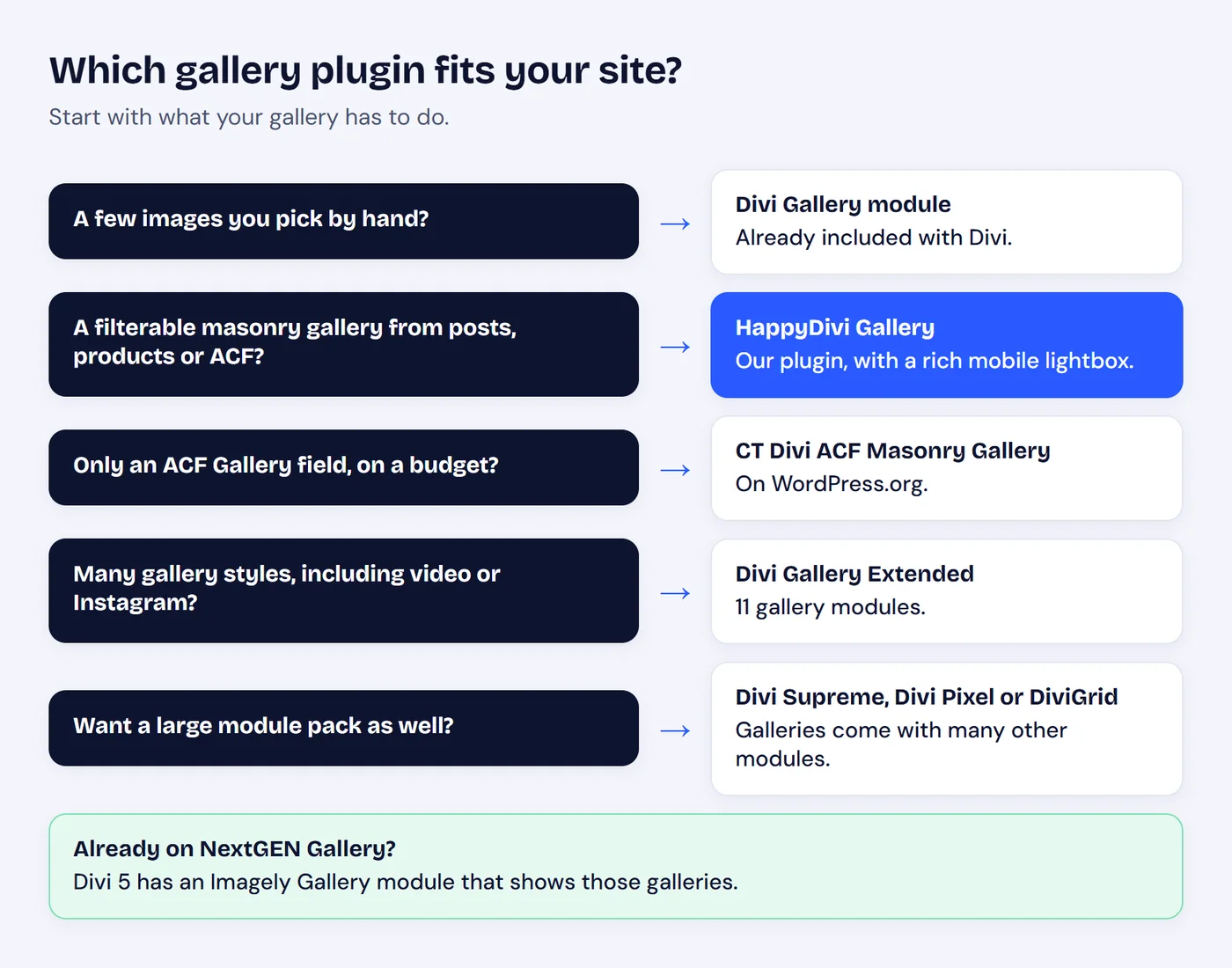
Stop at the first row that describes your gallery.
1. Divi Gallery Module
Best for: a small set of images you choose yourself.
Divi's Gallery module offers grid and slider layouts and images per page, with nothing extra to install. Divi 5 also has a Woo Product Gallery module for one product's images, and an Imagely Gallery module for sites using NextGEN Gallery.
Watch for: its guide lists no masonry layout, category filter, or dynamic content source. We go through this in what the Divi Gallery module cannot do.
2. HappyDivi Gallery
Best for: filterable and masonry galleries that fill themselves from your content, with a lightbox that feels at home on a phone.
This is our plugin. One Divi 5 module does the work, so you do not need one module for filters and another for masonry. It costs $25 a year for unlimited sites, or from $49 once.
A Filterable Gallery
Visitors filter by category with no page reload. The bar reads its labels from the items in the gallery, can stick to the top of the screen while visitors scroll, and can save the chosen filter in the URL so a visitor can share that exact view. Pagination resets by itself after each filter.
A Masonry Gallery
Each item goes into the shortest column and keeps its natural height, and the layout rearranges smoothly after every filter. You can switch the same gallery to grid or justified with one setting.

Filter, masonry and lightbox on a phone, from our live demo.
A Lightbox That Feels Like an App
On a phone, the lightbox behaves more like a photo app than a web popup:
- Natural gestures: swipe between images, swipe down to close, pinch or double-tap to zoom up to 4 times, and drag to look around.
- Native sharing: the Share button opens the phone's own share sheet.
- Quick browsing: a thumbnail strip and counter show where you are, and the next and previous images load ahead of time.
- More to do: download, fullscreen, rotate, slideshow and an info panel with photo details such as camera, aperture and ISO.
On a desktop it adds keyboard shortcuts, and it is a proper dialog that keeps keyboard focus inside while open.
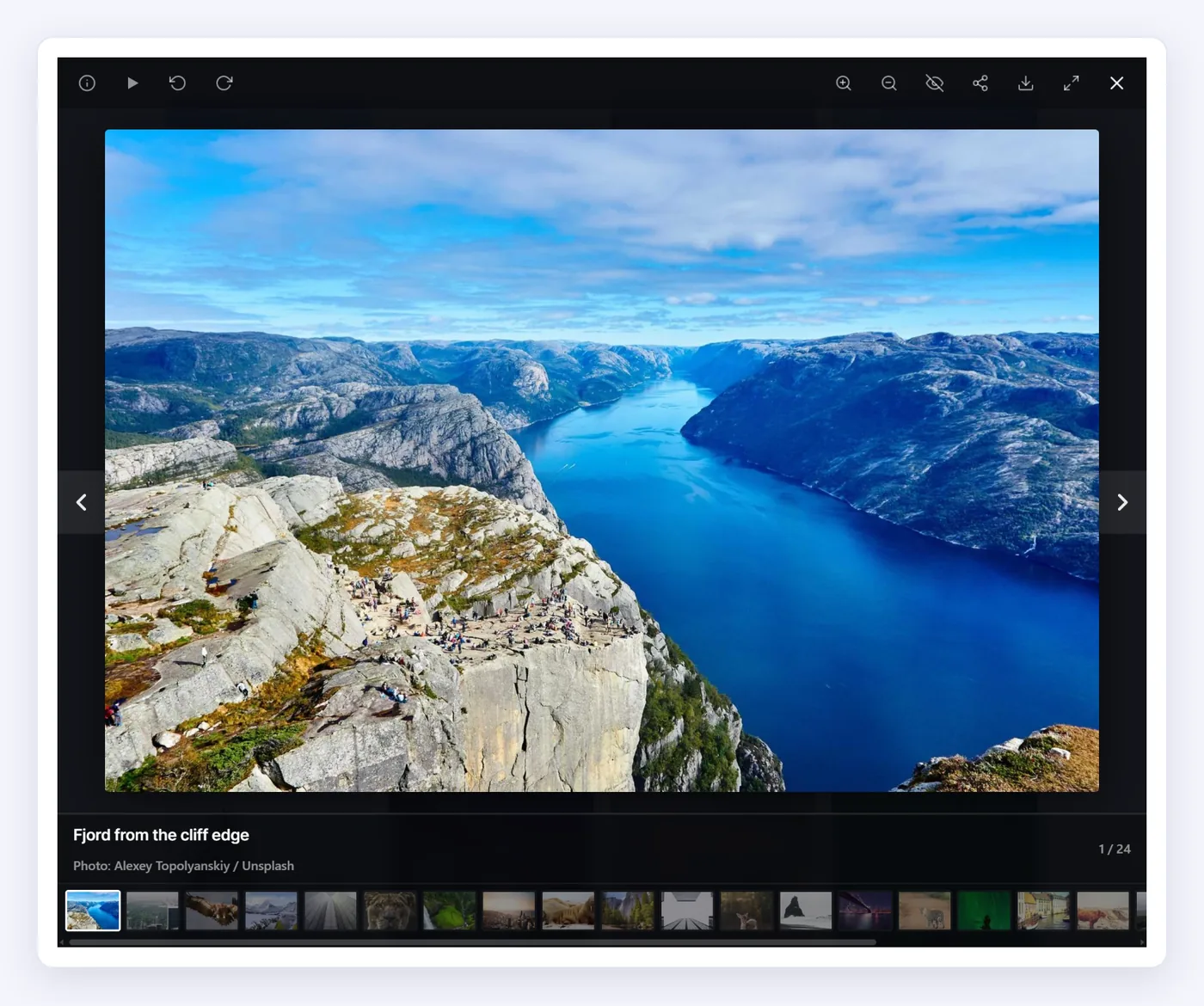
The same lightbox on a desktop.
Dynamic Content in One Module
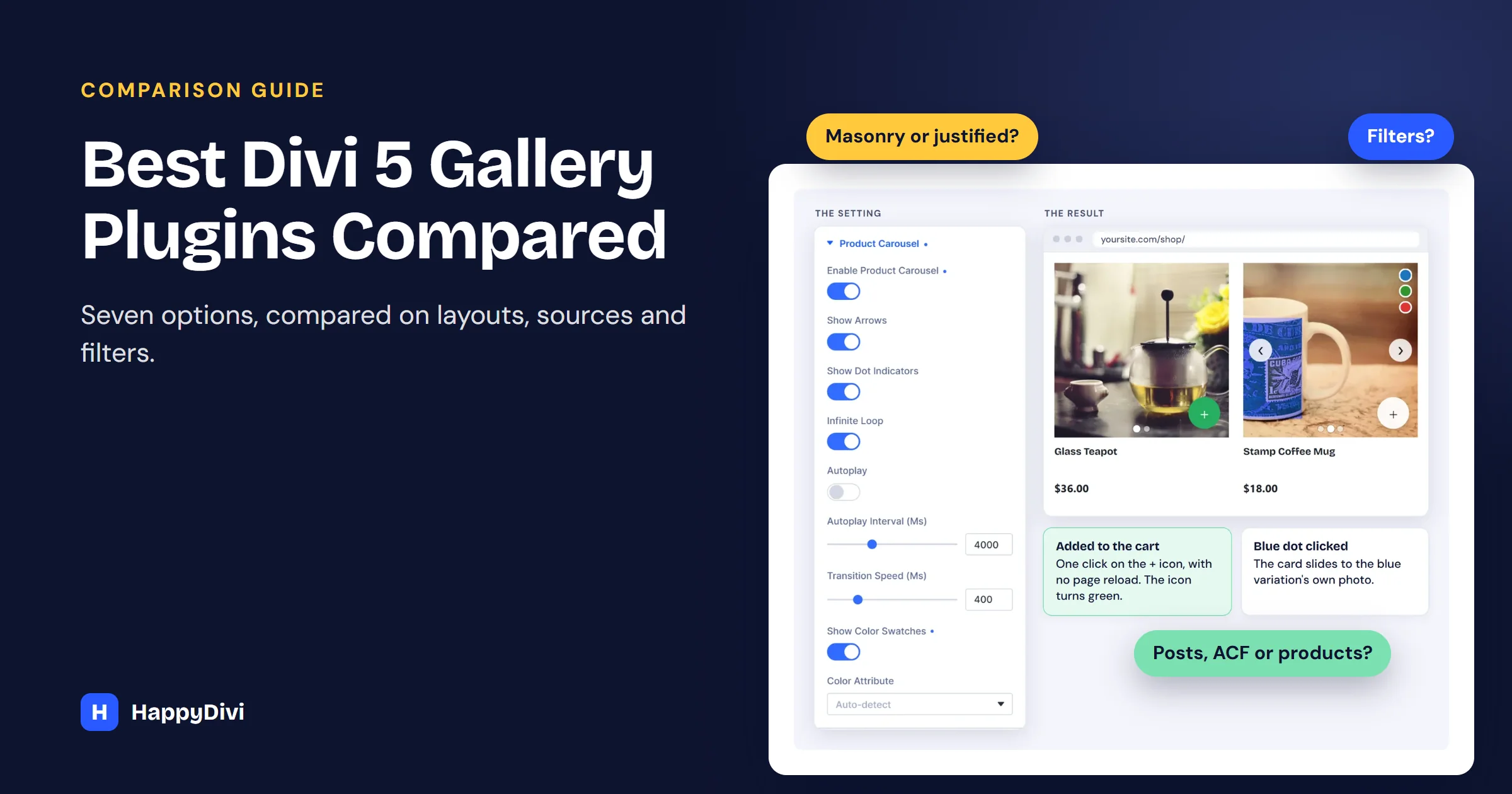
Images can come from the Media Library, posts, custom post types, ACF image and gallery fields, and WooCommerce products. For shops, each product card can have its own image slider, color dots and a cart icon.
Watch for: it needs Divi 5, and there is no free version. It focuses on image, post and product galleries, so it has no video gallery or Instagram feed. For the full picture, read our Divi 5 gallery guide, the masonry tutorial or the filterable portfolio build.
3. Divi Supreme Pro
Best for: sites that also want a large set of other modules.
Its Filterable Gallery is described as a native Divi 5 module, with category tabs, an optional lightbox and Load More or numbered pages. Images come from your own selection or Media Library categories. A separate module handles masonry. Divi Supreme Pro starts at $79 a year.
Watch for: the gallery page does not list posts, custom post types or ACF as sources, so check if you need dynamic content. On the plus side, Divi Supreme Modules is the most common Divi add-on we measured, on 12.82% of Divi sites.
4. Divi Gallery Extended
Best for: variety, including video and Instagram.
This plugin includes 11 gallery modules, from masonry and justified to bento, video, Instagram and image carousels. It says it is compatible with Divi 4 and Divi 5, and adds filters, pagination and a lightbox. It costs $29 a year or $99 once for unlimited sites.
Watch for: its dynamic galleries use image categories, and it does not list posts, ACF or WooCommerce as sources.
5. Divi Pixel
Best for: filterable galleries as part of a design toolkit.
Its Filterable Gallery adds a category taxonomy to your Media Library and offers masonry or grid layouts, with a Divi 5 Ready badge. There is also a separate Masonry Gallery module. Plans start at €49 a year for one site.
Watch for: images need categories in the Media Library, so a large library takes some setup. The price also covers the whole toolkit, so it makes most sense if you will use more of it.
6. DiviGrid
Best for: shareable gallery filters within a broad module pack.
DiviGrid adds over 50 modules, including masonry and justified galleries, and says it is built for Divi 5 and works in Divi 4. Its Masonry Gallery can save the chosen filter in the page URL, and has pagination and a lightbox. It starts at $19 a year for one site, or $69 for unlimited sites.
Watch for: we did not find custom post types, ACF or WooCommerce listed as gallery sources.
7. CT Divi ACF Masonry Gallery
Best for: showing an ACF Gallery field, with no paid plugin to buy.
This WordPress.org plugin reads an ACF Gallery field and offers masonry and grid layouts, pagination and a lightbox. Its October 2026 update added WooCommerce product gallery and post attachment sources, and its changelog notes Divi 5 work.
Watch for: the ACF Gallery field needs ACF Pro, which is a paid plugin. If you use the free ACF plugin, see our ACF gallery guide instead. Its page does not list category filters.
What Divi Sites Actually Use
In our scan of 156,778 Divi sites, no dedicated gallery plugin reached even 1%. Most Divi sites either use the built-in module or get galleries from a larger pack, so a plugin's popularity tells you little here. Choose by your content source instead.
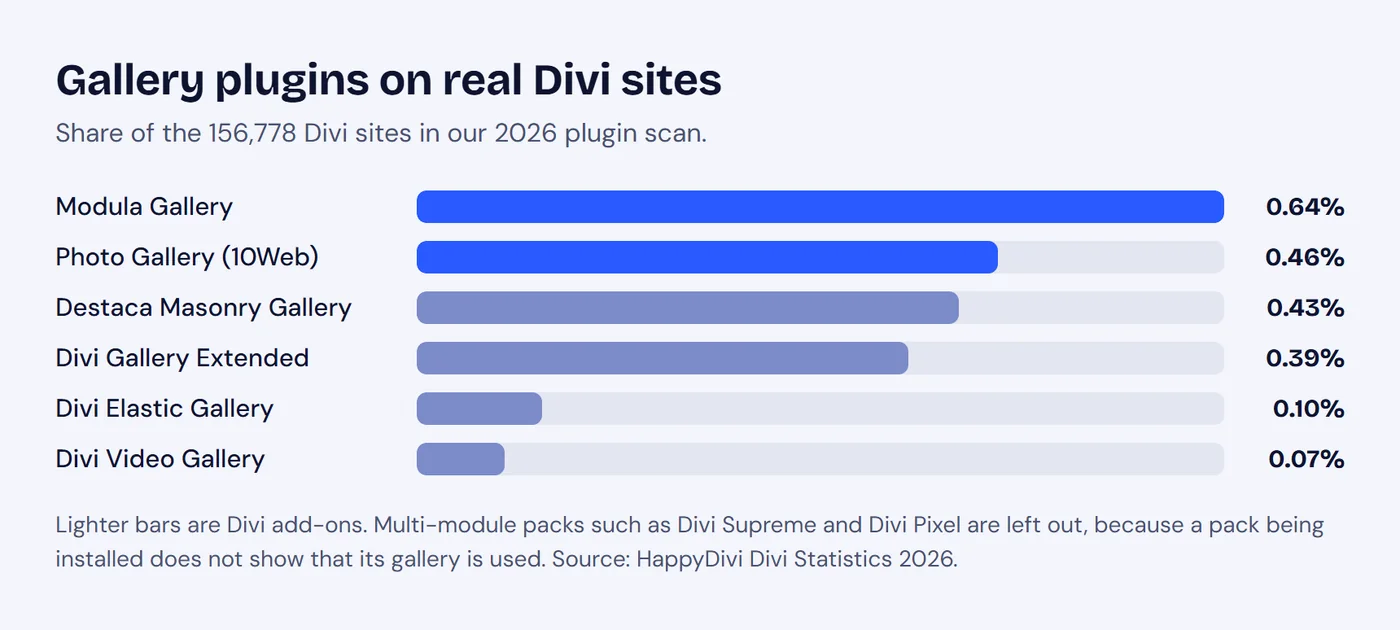
Every dedicated gallery plugin we measured is on under 1% of Divi sites.
HappyDivi Gallery does not appear in the published data, which only lists add-ons found on at least 100 sites. Modula and Photo Gallery are general WordPress plugins, not Divi modules, so you would build those galleries outside the Visual Builder.
A Note on WooCommerce Galleries
"WooCommerce gallery" can mean two different things. Divi's Woo Product Gallery module shows one product's images on its product page. A gallery of many products is a different job, and that is what HappyDivi Gallery's WooCommerce source does. If you only want color swatches on a shop grid, Woo Essential also offers those.
Frequently asked questions
What is the best free gallery plugin for Divi 5?
Start with Divi's own Gallery module, which comes with Divi. If you have an ACF Pro Gallery field, CT Divi ACF Masonry Gallery on WordPress.org is another no-cost option to try.
What is the best filterable gallery for Divi 5?
It depends on your images. HappyDivi Gallery suits galleries filled from posts, custom post types, ACF fields or products, and it can also use the Media Library. Divi Supreme Pro, Divi Gallery Extended, Divi Pixel and DiviGrid filter images by Media Library or image categories.
Does Divi 5 have a masonry gallery?
Elegant Themes' guide to the Divi 5 Gallery module lists grid and slider layouts, not masonry. For masonry, use a plugin such as HappyDivi Gallery, Divi Gallery Extended, Divi Pixel, DiviGrid or Divi Supreme.
Which Divi gallery plugins support WooCommerce?
HappyDivi Gallery shows products as a gallery source. CT Divi ACF Masonry Gallery added a WooCommerce product gallery source in October 2026. Divi also has its own Woo Product Gallery module for one product's images.
Which Divi gallery plugins work with ACF?
HappyDivi Gallery reads ACF image and gallery fields, including image fields from the free ACF plugin. CT Divi ACF Masonry Gallery reads ACF Gallery fields, which need ACF Pro.
Which Divi gallery has the best lightbox on mobile?
We can only speak for our own, as we did not test the others. HappyDivi Gallery supports swipe to navigate, swipe down to close, pinch and double-tap zoom up to 4 times, and the phone's own share sheet.
From HappyDivi
HappyDivi Gallery
One Divi 5 module for galleries from WooCommerce, custom post types and ACF fields.
- Grid, Masonry and Justified layouts
- Built-in lightbox
30-day money-back guarantee
Want the full detail? Read the complete Divi 5 gallery guide.
From HappyDivi
HappyDivi Gallery
One Divi 5 module for galleries from WooCommerce, custom post types and ACF fields.
- Grid, Masonry and Justified layouts
- Built-in lightbox
30-day money-back guarantee