Who this guide is for
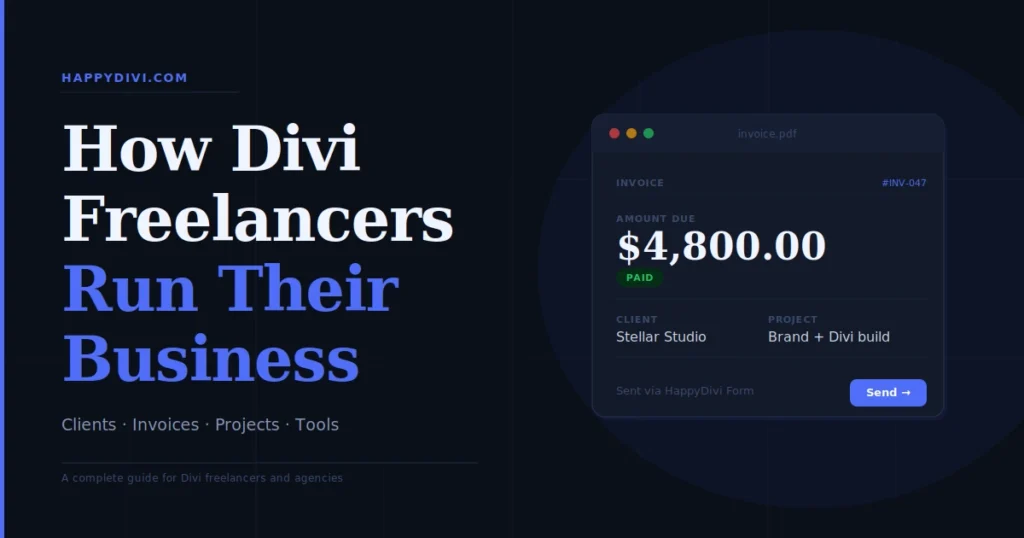
This article is written for Divi freelancers and agencies who use Divi 5 to build client websites and need practical tools to run the business side: client management, project tracking, invoicing, contracts and handoff workflows. The tools covered are independent of Divi itself: they run alongside your Divi workflow, not inside it.
From HappyDivi
Liven New
A small character and hand-drawn cues that point visitors to what matters on your site.
- Works with Divi 5 and Elementor on one licence
- No cookies, no tracking, a Pause button for visitors
30-day money-back guarantee
Introduction: The gap nobody talks about
You can be exceptional at building Divi 5 websites. You can know every module, every setting, every performance trick. And you can still run a chaotic, unprofitable freelance business because the tools you use to manage clients, track projects, and send invoices are not connected to each other.
The typical pattern: a new client inquiry arrives by email. You respond in Gmail. The proposal goes out as a PDF in Google Drive. They sign it in DocuSign. The project lives in a Trello board. You track time in Toggl. The invoice goes out in PayPal. Three months later you cannot find where you agreed on the revision policy, and the client says they never approved the final scope. You recognise this.
The problem is not any single tool: it is that each tool does one thing well, but nothing connects. The typical patchwork is Trello for tasks, Toggl for time, and Google Docs for proposals. Each switch between tools costs mental overhead, creates gaps where information falls through, and makes your business look less professional than the websites you build for your clients.
This guide is for Divi freelancers who build websites for clients and for small agencies managing multiple Divi projects simultaneously. It covers what actually matters: the specific tools that fix the specific gaps in a Divi web design business, with honest notes on what each tool does not do well.
Part 1: Understanding your actual workflow gaps
Before choosing any tool, map the four stages where Divi freelancers consistently lose time or money.
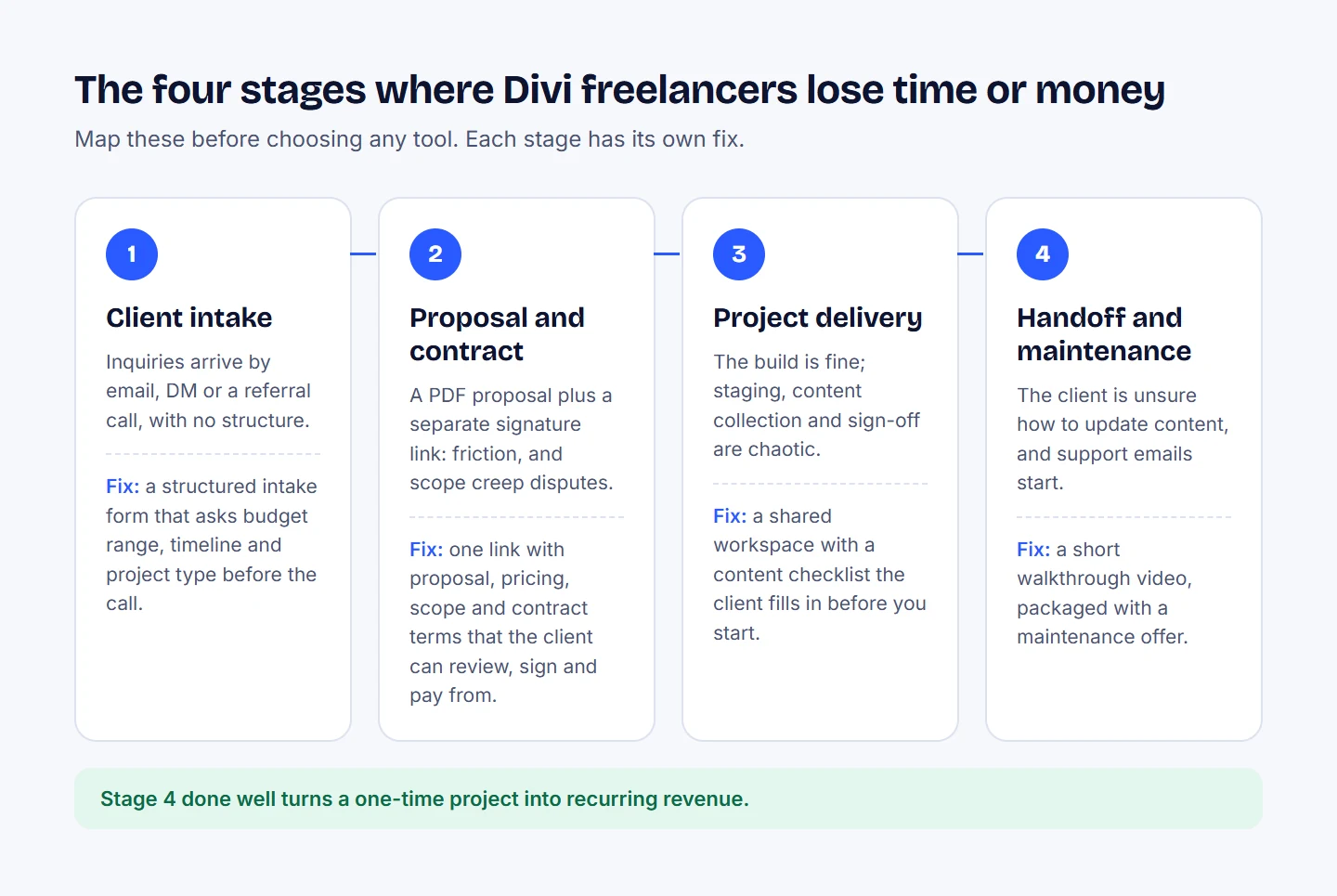
The four stages from Part 1, each with the fix this guide recommends.
Stage 1: Client intake
Most Divi freelancers handle new client inquiries informally: an email, a DM, a referral call. The problem is that without a structured intake process, you end up spending an hour on discovery calls with clients who cannot afford you, who want a five-page website for $200, or who need something you do not build. A structured intake form that asks about budget range, timeline, and project type filters this out before the call.
A contact form on your Divi 5 site handles this: and if you are using HappyDivi Form as your native Divi 5 form module, you can build a multi-field intake form that feeds directly into your workflow without requiring a separate form plugin. The form sits natively in the Divi 5 visual builder with live preview, so you can style it to match your site without custom CSS.
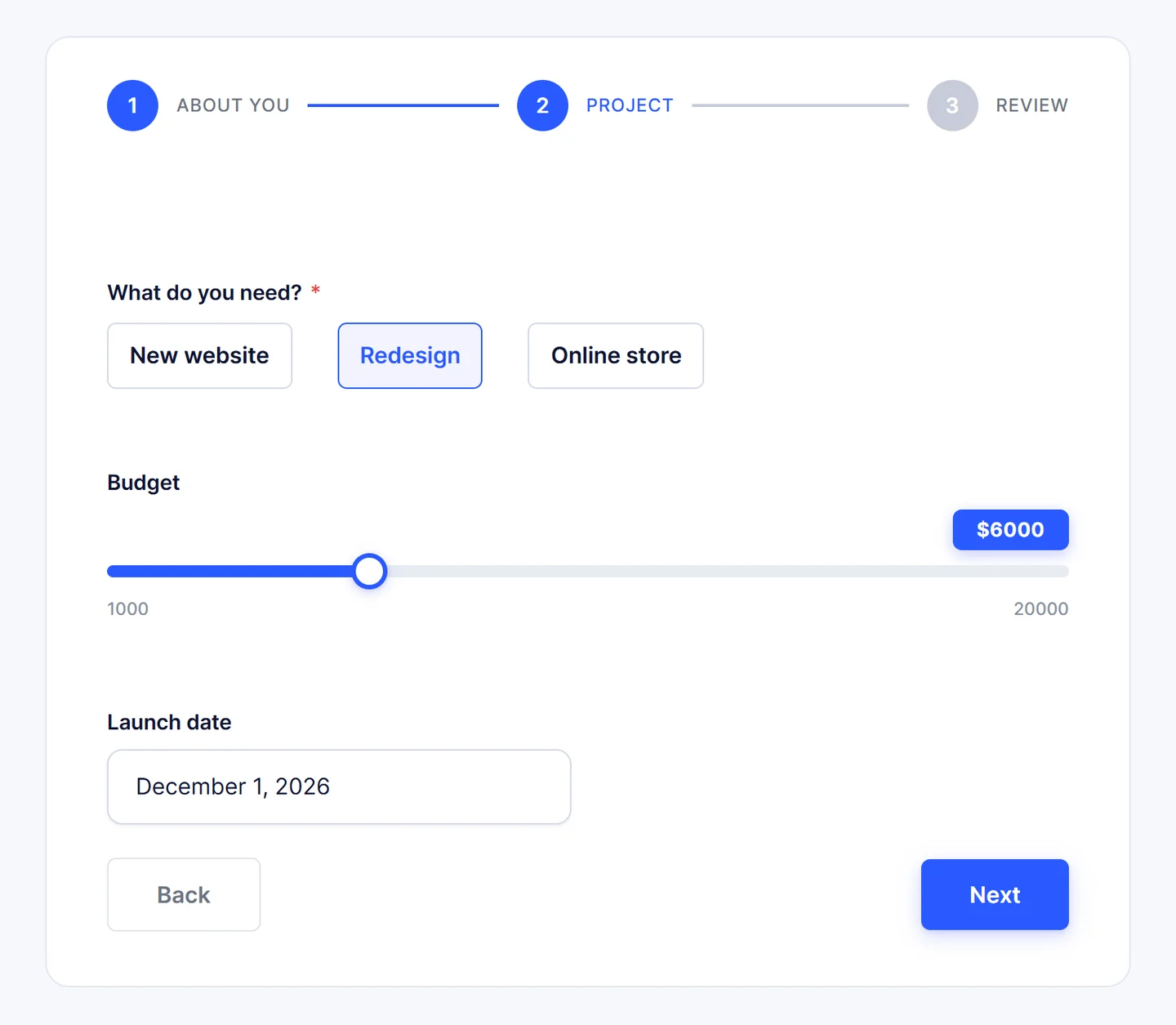
An intake form built with HappyDivi Form, step two of three: project type, a budget range and a launch date.
Stage 2: Proposal and contract
This is where most freelancers are weakest. Sending a PDF proposal via email and a separate DocuSign link introduces friction and creates a paper trail that is hard to track. More importantly, proposals sent without an embedded contract typically result in scope creep disputes: because the client signed the proposal, not the terms.
The best practice is a single document: proposal, pricing, scope, and contract terms, all in one link that the client can review, sign, and pay from. Tools like Bonsai, HoneyBook, and Plutio all do this. The distinction matters: many freelancers use Proposal tools for the document but still chase signatures and payments separately.
Stage 3: Project delivery
Once the client is signed, the actual Divi 5 build starts. This is where Divi freelancers are typically strong: the work itself. But the surrounding infrastructure (staging, revision tracking, content collection, approval sign-off) is usually chaotic. Most Divi agencies do not have a formal content collection system, which means projects stall waiting for the client to send logo files, copy, and images.
A simple shared workspace: even a shared Notion page: with a content checklist the client fills in before you start removes this bottleneck. When combined with MainWP for managing staging sites across multiple client installs, you get a repeatable delivery system rather than reinventing it for every project.
Stage 4: Handoff and maintenance
The moment a Divi 5 site is launched, two things usually happen simultaneously: the client gets confused about how to update content, and you start getting support emails. Without a handoff process, you spend unbillable hours answering questions about things you already set up.
A short Loom video walkthrough (under ten minutes) covering the Divi 5 visual builder, how to update the gallery or contact form, and what not to touch costs you twenty minutes once and saves hours per client. Packaging this alongside a maintenance offer: monthly updates, plugin management, uptime monitoring: converts your one-time project into recurring revenue.
Part 2: The tools, honestly assessed
All-in-one platforms (for freelancers who want one system)
Plutio ($19/month) flat
Plutio connects proposals, contracts, projects, tasks, time tracking, invoicing, scheduling, forms, and a white-labeled client portal into one platform at a flat $19/month.
For a Divi freelancer managing ten to thirty active clients, Plutio is the most practical single-tool option in 2026. The workflow is connected: a proposal converts into a project with tasks already mapped, time tracked against those tasks becomes invoice line items with one click, and clients receive invoices through a branded portal where they pay by card or bank transfer.
The white-label client portal is particularly valuable for agencies: your clients log in to a portal that looks like your brand, not a third-party platform. They can see project status, approve deliverables, download invoices, and send messages without you having to email updates.
-
- What Plutio does not do well: The project management side of Plutio is competent but not as powerful as dedicated tools like ClickUp or Asana. If you are managing a team of five or more people with complex task dependencies, Plutio's task system will feel limited. It is built for solo freelancers and very small agencies, not for ten-person teams.
-
- Best for: Solo Divi freelancers and agencies with one to three team members who want one bill and one login instead of five separate subscriptions.
Bonsai ($25/month) (Essentials)
Bonsai covers contracts, invoicing, time tracking, and project management, with tax preparation tools built in. The standout feature for Divi freelancers based in the USA is the built-in tax preparation system: it categorises your income and expenses automatically and generates the quarterly estimated tax figures you need to file correctly. This removes the most stressful part of freelancing: not knowing what you owe until April.
Bonsai also has the cleanest contract template library of any freelance platform. For Divi agencies who are not lawyers but need contracts that actually protect them against scope creep and non-payment, Bonsai's templates are well-drafted and customisable.
-
- What Bonsai does not do well: The base plan at $15/month only includes time tracking and task management. Invoicing, proposals, contracts, and the client portal all require the Essentials plan at $25/month. For larger agencies, the user permissions system is limited: you can designate team members as partners with access to all financial data, or as collaborators with limited access, but you cannot customise permissions granularly by role.
-
- Best for: USA-based Divi freelancers who file quarterly taxes and want client work and tax compliance in one platform.
HoneyBook ($36/month)
HoneyBook covers proposals and invoicing but locks automations behind the $59/month Essentials plan and shows HoneyBook branding on client documents unless you upgrade.
HoneyBook is popular among creative freelancers and has a clean, well-designed interface. The smart file feature lets you combine a lead form, proposal, contract, and invoice into one client-facing document that walks through each step in sequence. This is genuinely good for improving the client intake experience.
However, for Divi web designers specifically, HoneyBook's automation features: automatic follow-up emails, onboarding sequences, reminder triggers: are only available on the $59/month plan. At that price point, you can get more functionality from Plutio or Bonsai for less. HoneyBook makes most sense if your income comes from creative services like branding or photography alongside web design, as its questionnaire and scheduling tools are tailored to that workflow.
-
- What HoneyBook does not do well: The project management side is minimal. HoneyBook is a client workflow platform, not a project tracker. You will need a separate tool for task management if your projects have complex delivery milestones.
-
- Best for: Divi freelancers who also do branding, photography, or other creative services alongside web design, and want strong client communication tools.
Project management (for agencies with teams or complex projects)
ClickUp. Free tier available, paid from $7/user/month
For agencies managing one to five clients, ClickUp handles project management alongside MainWP or ManageWP for site oversight.
ClickUp is the most flexible project management tool available and the most commonly used among WordPress and Divi agencies in 2026. The reason is that it adapts to almost any workflow: you can run a Kanban board for a solo project, a Gantt chart for a multi-phase agency build, a time-tracked sprint for a retainer client, and a shared client-facing task list, all in the same workspace.
For Divi agencies, the template system is where ClickUp pays for itself. Create a Divi Website Build template with every standard phase: kickoff, content collection, design, Divi build, QA, launch prep, handoff: and apply it to every new project in seconds. Every task you have ever forgotten to do on a project becomes a checklist item you cannot miss.
-
- What ClickUp does not do well: It does not do invoicing or contracts. You need a separate tool for that side of your business. It also has a steeper learning curve than simpler alternatives like Trello: the flexibility is a benefit and a liability simultaneously. New team members need time to understand your workspace structure.
-
- Best for: Divi agencies managing three or more simultaneous client projects with team members, who need structured task tracking and are comfortable setting up their own workflow templates.
Notion. Free tier available, paid from $10/user/month
Notion is not purpose-built for project management but is used extensively by solo Divi freelancers as a combination project tracker, knowledge base, and client workspace. The key use case is the shared client portal: a Notion page shared with a client where they submit content, view project status, access brand guidelines, and find login credentials.
This eliminates dozens of emails like "can you send me the logo again?" and "what was the WordPress login?" because everything lives in one shared link the client has bookmarked.
-
- What Notion does not do well: It has no invoicing, no time tracking, and no contract management. For freelancers who need those features, Notion works best as a supplement to a tool like Bonsai or Plutio, not as a replacement.
-
- Best for: Solo Divi freelancers who want a flexible workspace and are comfortable building their own system structure. Not ideal for people who want a structured out-of-the-box workflow.
Invoicing (standalone, if you already have project management)
Wave. Free (invoicing and accounting)
Wave is the most important tool on this list that most freelancers do not know about. It is free, permanently, not a free trial. It handles professional invoicing, expense tracking, and basic accounting for freelancers who do not need the full platform of Bonsai or Plutio.
For Divi freelancers based outside the USA (including Bangladesh, UK, Australia, Canada, and EU countries), Wave is often the most practical invoicing option because it supports multi-currency invoicing and generates clean, professional invoices with your logo and branding. International wire transfers and Stripe payments are supported.
-
- What Wave does not do well: Wave does not have proposals, contracts, project management, or a client portal. It is purely an invoicing and accounting tool. If you also need those features, you need a separate platform.
-
- Best for: Divi freelancers anywhere in the world who need free, professional invoicing and basic expense tracking without committing to a paid subscription.
Invoice Ninja. Free self-hosted or $10/month cloud
Invoice Ninja is a cloud-based invoicing platform that offers invoice creation, time tracking, expense management, and client management features. The self-hosted version (free on your own server) is particularly relevant to Divi developers, because you can host Invoice Ninja on the same VPS where you host client staging sites, keeping all infrastructure costs under one roof.
The client portal feature gives each client a login where they can view their invoices, see payment history, and access quotes: without you needing to set up a full CRM. For agencies that want a professional billing experience without paying $20–$50/month for an all-in-one platform, Invoice Ninja on a self-hosted server is genuinely excellent value.
-
- Best for: Technically comfortable Divi developers who are already managing their own server and want free, self-hosted invoicing with a full client billing portal.
WordPress-specific tools for Divi agencies
These are the tools that are specific to managing Divi 5 client websites at scale. They do not appear in general freelancer tool roundups but are critical for agencies managing five or more WordPress installs.
MainWP. Free core, paid extensions
MainWP is a self-hosted WordPress management dashboard that lets you manage unlimited client WordPress sites from a single interface. From one screen you can update plugins across all your client sites simultaneously, run security scans, push theme updates, check uptime, generate client reports, and manage backups.
For Divi agencies specifically, MainWP is where you push Divi updates and third-party plugin updates across your entire client portfolio without logging into each site individually. When a Divi 5 update releases, you update everything from MainWP in one session rather than logging into twenty client dashboards.
The Client Reports extension generates white-label monthly maintenance reports you can send to clients on retainer plans: showing what was updated, when backups ran, and what security events were detected. This justifies the retainer cost in a single email.
-
- What MainWP does not do well: It requires a dedicated WordPress installation to host the MainWP dashboard itself. This is a minor setup cost (it can run on a small $5/month VPS or your own hosting plan) but it is an extra step compared to cloud tools like ManageWP.
-
- Best for: Divi agencies managing five or more client WordPress sites who want a self-hosted, one-time-cost site management solution rather than a monthly per-site SaaS fee.
ManageWP. Free for basic, paid tiers per site
ManageWP is the cloud-hosted alternative to MainWP. No self-hosting required: you connect client sites to ManageWP's central dashboard and manage updates, backups, security, and uptime from a cloud interface. The free plan is genuinely useful: unlimited sites, core WordPress updates, and plugin updates at no cost.
Paid add-ons per site (around $1–$2/month per feature per site) cover automated backups, uptime monitoring, performance checks, and client reports. For agencies with fewer than fifteen sites, ManageWP's cloud approach is often simpler to maintain than self-hosting MainWP.
-
- Best for: Divi agencies who want cloud-based site management without the overhead of hosting a self-managed MainWP dashboard.
UpdraftPlus. Free or $70/yr premium
Backups are not glamorous, but they are the single most important infrastructure decision for a Divi agency. UpdraftPlus is the standard backup plugin for Divi sites, with remote storage to Google Drive, Dropbox, Amazon S3, Backblaze B2, and other destinations.
For agencies running Divi 5, the premium version adds automatic pre-update backups. before any Divi 5 update runs, a full site backup is created automatically. When a client site breaks after a Divi update (this happens), you can restore it in minutes rather than rebuilding from memory.
-
- Best for: Every Divi agency, no exceptions. Run UpdraftPlus on every client site. It is not optional.
WP Staging. Free or $99/yr premium
Every Divi 5 project should be built on staging before going live. WP Staging creates a subdomain staging environment on the same server as the live site, lets you build and test in Divi 5, and then pushes changes to the live site when approved. The premium version enables direct push-to-live with database synchronisation.
For Divi agencies, the staging workflow should be non-negotiable: client approves the design on staging, you push to live, client confirms, project is closed. This eliminates the "can we change this on the live site" problem that turns project delivery into an indefinite revision cycle.
-
- Best for: Divi agencies who build new sites or make significant changes on existing client sites. Run WP Staging on every project.
Part 3: Building a real system: what the workflow actually looks like
Here is a complete Divi freelancer workflow that uses the tools above without overlap or gaps.
The stack for a solo Divi freelancer (under $50/month total)
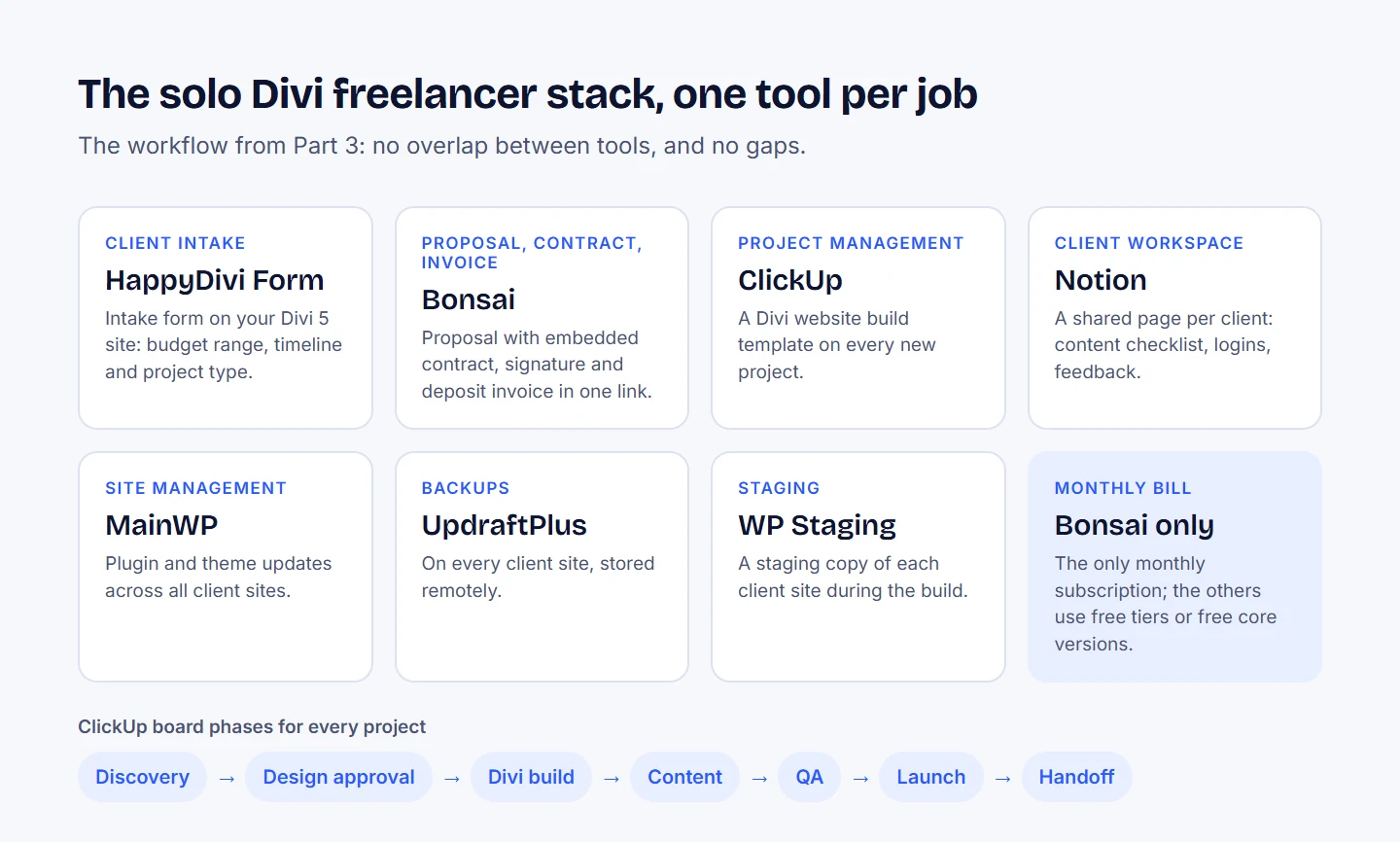
The solo stack at a glance: one tool per job, and the ClickUp phases every project moves through.
-
- Client intake: HappyDivi Form on your Divi 5 portfolio site: multi-field intake form with budget range, timeline, and project type fields. Free with your HappyDivi Form license.
-
- Proposal, contract, invoicing: Bonsai ($25/month): sends the proposal with embedded contract, collects the signature, and triggers the deposit invoice automatically. All in one client-facing link.
-
- Project management: ClickUp (free tier). Divi Website Build template applied to every new project. Kanban board with phases: Discovery → Design Approval → Divi Build → Content → QA → Launch → Handoff.
-
- Client workspace: Notion (free): shared page per client with content submission checklist, login credentials, and feedback notes.
-
- Site management: MainWP (free core) on your hosting: manages plugin and theme updates across all client sites.
-
- Backups: UpdraftPlus on every client site: remote to Google Drive or Backblaze B2.
-
- Staging: WP Staging free tier: staging environment on each client site during build.
-
- Total cost: $25/month (Bonsai). ClickUp free tier, Notion free tier, MainWP self-hosted, WP Staging free, UpdraftPlus free. Add UpdraftPlus Premium at $70/yr if you want automated pre-update backups.
The stack for a small Divi agency (two to five people)
-
- Client intake + CRM: Plutio ($19/month flat, unlimited clients): handles intake, proposals, contracts, projects, time tracking, and invoicing in one platform.
-
- Project management detail: ClickUp ($7/user/month): detailed task management linked to Plutio projects.
-
- Site management: ManageWP (paid tier): cloud-based management of all client WordPress installs.
-
- Backups: UpdraftPlus Premium ($70/yr): automated pre-update backups on all client sites.
-
- Staging: WP Staging Pro ($99/yr): staging on all active project sites with push-to-live.
-
- Total cost: ~$100/month for a three-person team. Compared to the billing rate of a Divi agency (typically $1,000–$5,000 per project), this is not a meaningful expense.
Part 4: The handoff and how to make it earn recurring revenue
The handoff is the most overlooked opportunity in a Divi freelancer's business. Most agencies treat project launch as the end of the client relationship. Professional agencies treat it as the beginning of a recurring revenue stream.
Here is a practical handoff package for a Divi 5 project:
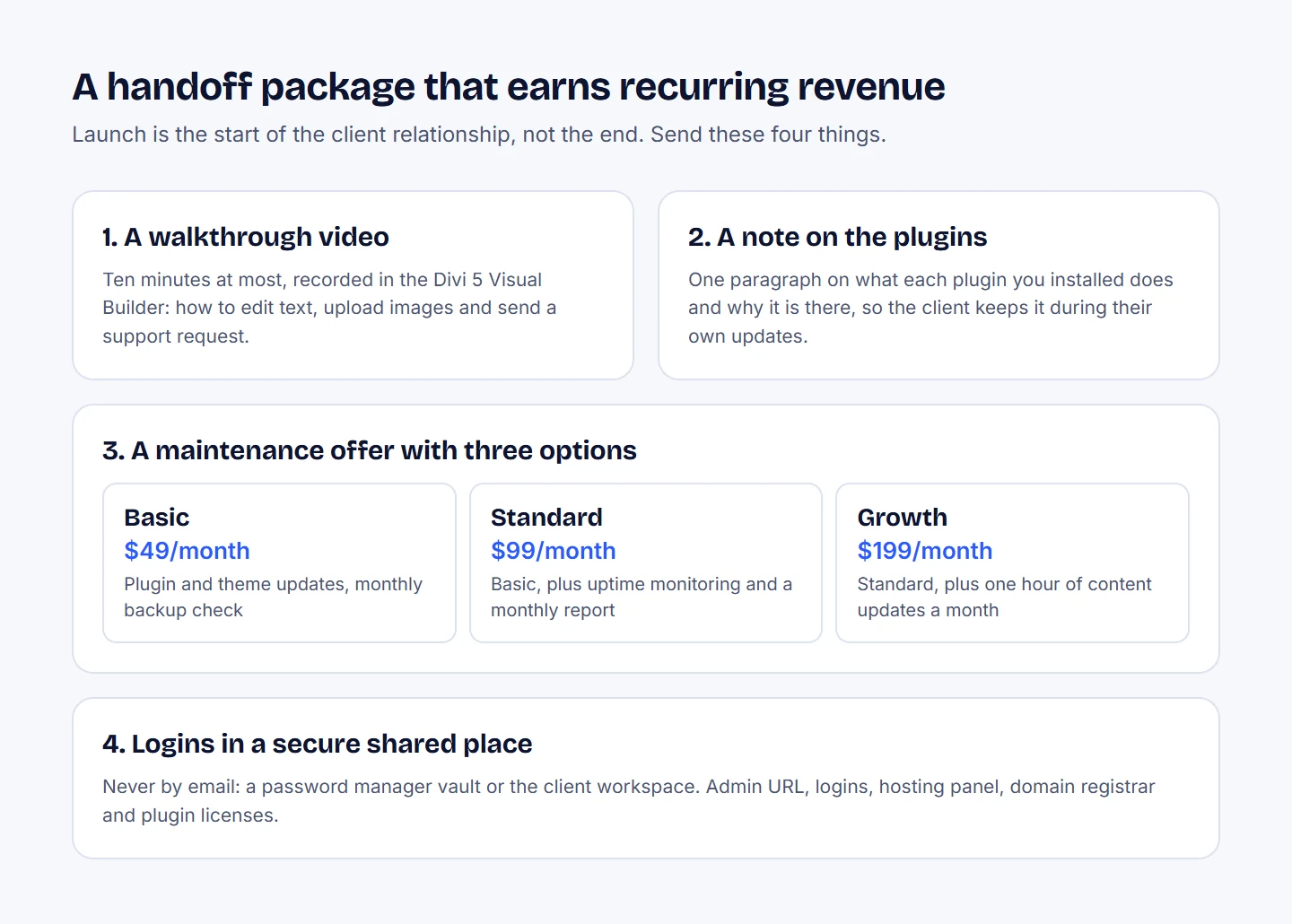
The handoff package from Part 4, with the three maintenance plans it suggests.
A Loom video walkthrough (ten minutes maximum). Screen record yourself in the Divi 5 visual builder showing: how to edit text, how to upload images, how to submit a support request. Send the link in the handoff email. This reduces support questions by around sixty percent immediately.
A maintenance offer. Send the handoff email with three options: a basic plan at $49/month (plugin updates, theme updates, monthly backup check), a standard plan at $99/month (above plus uptime monitoring and monthly report), and a growth plan (above plus one hour of content updates per month, $199/month). Offer a discount for the first three months. Many clients take the offer simply because they do not want to think about updates.
A HappyDivi Gallery or HappyDivi Form note. If you have installed HappyDivi Gallery or HappyDivi Form on their site, include a one-paragraph note in the handoff explaining what it does and why it is there. Clients who understand the value of their tools are less likely to uninstall them when they are doing their own updates. It also reinforces your expertise.
Login credentials in a secure shared location. Never send passwords in email. Use a shared 1Password vault, Bitwarden, or the Notion client workspace you set up during the project. Document the WordPress admin URL, login credentials, hosting panel access, domain registrar, and the Divi 5 plugin license details.
Part 5: The biggest mistakes Divi freelancers make with their business systems
Mistake 1: Using a new tool for every problem instead of fixing the workflow. The problem is almost never the tool. A freelancer who chases new project management apps every three months has an unclear workflow, not a software problem. Map your actual process first, then choose the tool that fits it.
Mistake 2: Not having a signed contract before starting work. This is the most expensive mistake in web design. The revision clause, the kill fee, the intellectual property terms, and the payment schedule must be in writing and signed before a single Divi module is placed. Bonsai and HoneyBook both include template contracts specifically for web designers that cover these terms.
Mistake 3: Building on the live site. Always build on staging. Always. A client who sees you making half-finished design changes on their live site loses confidence in you, even if the final result is excellent. WP Staging makes this a one-click process.
Mistake 4: Not charging for maintenance. WordPress sites require ongoing maintenance: plugin updates, security patches, backup verification, PHP version management. If you are doing this for free as part of "support," you are working for free. A basic maintenance plan pays for your time and gives clients the confidence that someone is watching their site.
Mistake 5: Over-tooling early. Solo freelancers with fewer than five active clients do not need a $100/month tech stack. Wave (free invoicing), ClickUp (free project management), and Notion (free client workspace) cover the fundamentals at no cost. Add paid tools only when you can identify the specific hours you are losing that a paid tool would recover.
Frequently asked questions
What is the best invoicing tool for Divi freelancers?
For solo freelancers who need free invoicing, Wave is the best option: it is permanently free with multi-currency support and professional invoice templates. For freelancers who want proposals, contracts, and invoicing in one platform, Bonsai ($25/month) or Plutio ($19/month) are the strongest options in 2026.
How do Divi agencies manage multiple client WordPress sites?
The standard approach is MainWP (self-hosted, free core) or ManageWP (cloud-hosted, free for basic). Both let you update plugins, themes, and WordPress core across all client sites from a single dashboard. MainWP is better for agencies with large client portfolios who prefer a self-managed infrastructure. ManageWP is simpler to set up for smaller agencies.
Should I use a CRM for my Divi freelance business?
For most solo Divi freelancers, a full CRM like HubSpot is unnecessary. A simpler all-in-one platform like Plutio or Bonsai handles the CRM functions you actually need: contact records, project history, invoice records, and communication logs. A dedicated CRM becomes useful when your agency is actively doing outbound sales and needs pipeline tracking.
How do I get clients to pay on time?
The most effective change is requiring a deposit (typically 30–50%) before starting work, with the balance due on launch day: not after. Bonsai and Plutio both support deposit invoices that trigger automatically when a proposal is signed. Automatic payment reminders are a close second: both platforms can send reminder emails three days before, on the due date, and three days after without any manual action.
What should I include in a Divi 5 site handoff?
A complete handoff includes: a Loom video walkthrough of the Divi 5 visual builder, all login credentials in a secure shared location (not email), a written guide to what plugins are installed and what each one does, a maintenance offer with clear pricing, and a signed acknowledgement that the client has received the project. The last item matters: a written handoff confirmation creates a clear project close date that prevents indefinite "one more small thing" requests.
How do I price Divi website maintenance plans?
A common structure for 2026: $49/month for basic (plugin updates, backup verification, uptime monitoring), $99/month for standard (above plus monthly report and security scan), $199/month for growth (above plus one hour of monthly content updates). Offer the first month at 50% to lower the barrier to entry. Maintenance plans billed annually at a small discount improve client retention and make your revenue predictable.
What is the best project management tool for a small Divi agency?
ClickUp is the most widely used project management tool among WordPress agencies in 2026 for its flexibility and template system. For agencies that want project management and invoicing in one platform, Plutio covers both at $19/month. For agencies with complex team workflows and multiple simultaneous projects, ClickUp's paid tiers ($7/user/month) provide more advanced dependency tracking and reporting.
From HappyDivi
Liven New
A small character and hand-drawn cues that point visitors to what matters on your site.
- Works with Divi 5 and Elementor on one licence
- No cookies, no tracking, a Pause button for visitors
30-day money-back guarantee