To accept Stripe payments with a Divi form, you need a form module with payments built in, because Divi's own Contact Form has no payment option. With HappyDivi Form Pro, you turn on Require Payment, set a price or calculated amount, and visitors pay on Stripe's secure checkout.
A photographer taking a booking deposit does not need a full shop. Neither does a consultant selling one call. Think of this guide as a recipe: we will build a booking form that charges a 25% deposit, then show how to adapt it.
What You Need
- HappyDivi Form Pro. Payments and the Calculated field are Pro features.
- A Stripe account, plus its test keys for rehearsing.
- About 20 minutes.
Step 1: Connect Stripe
Go to HappyDivi Form → Settings → Payments, tick Enable payments, keep Mode on Test and paste your test keys. Saving a secret key also tries to create the Stripe webhook for you. On a local site, Stripe cannot reach your server, so you would use the Stripe CLI instead.
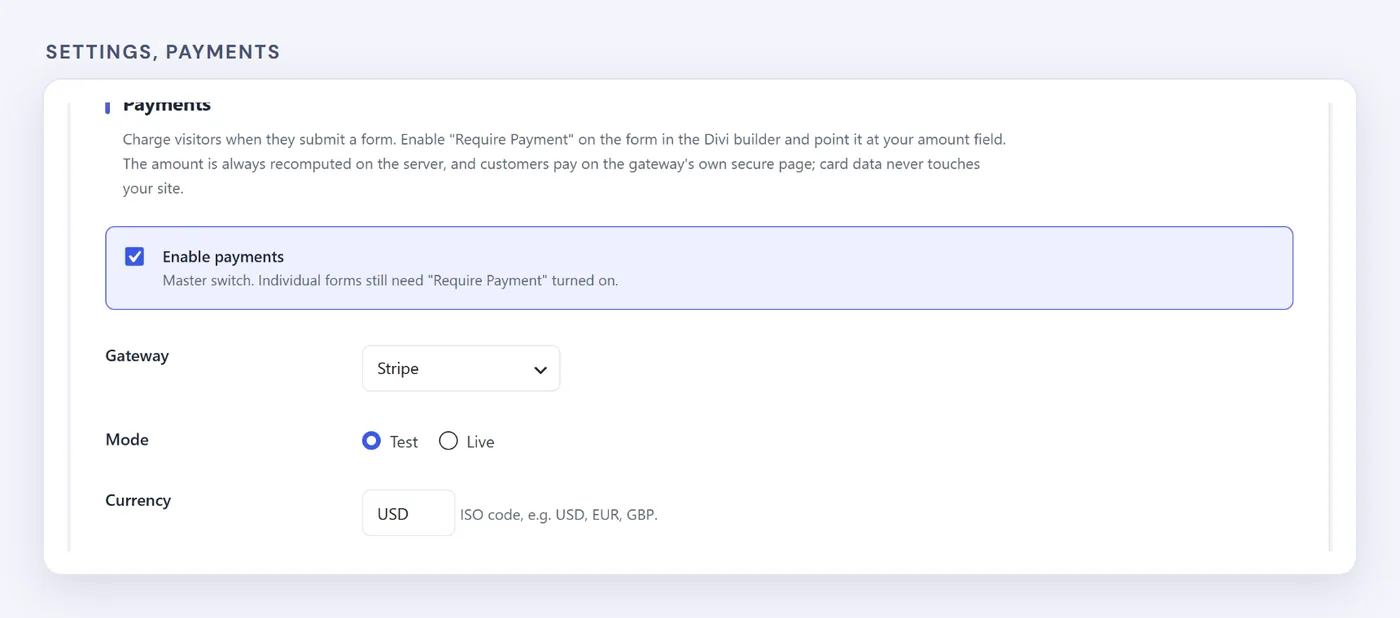
Master switch, gateway, mode and currency.
Step 2: Add Priced Options and a Deposit Total
Build the form in the Visual Builder:
- Add Your Name and Email Address fields.
- Add a Select Dropdown called Choose a Package with the Field ID
package. Give each option its own price: 500, 900 and 1,500. - Add a Calculated field called Deposit Due Today with the Field ID
deposit, and set its formula to{package} * 0.25.
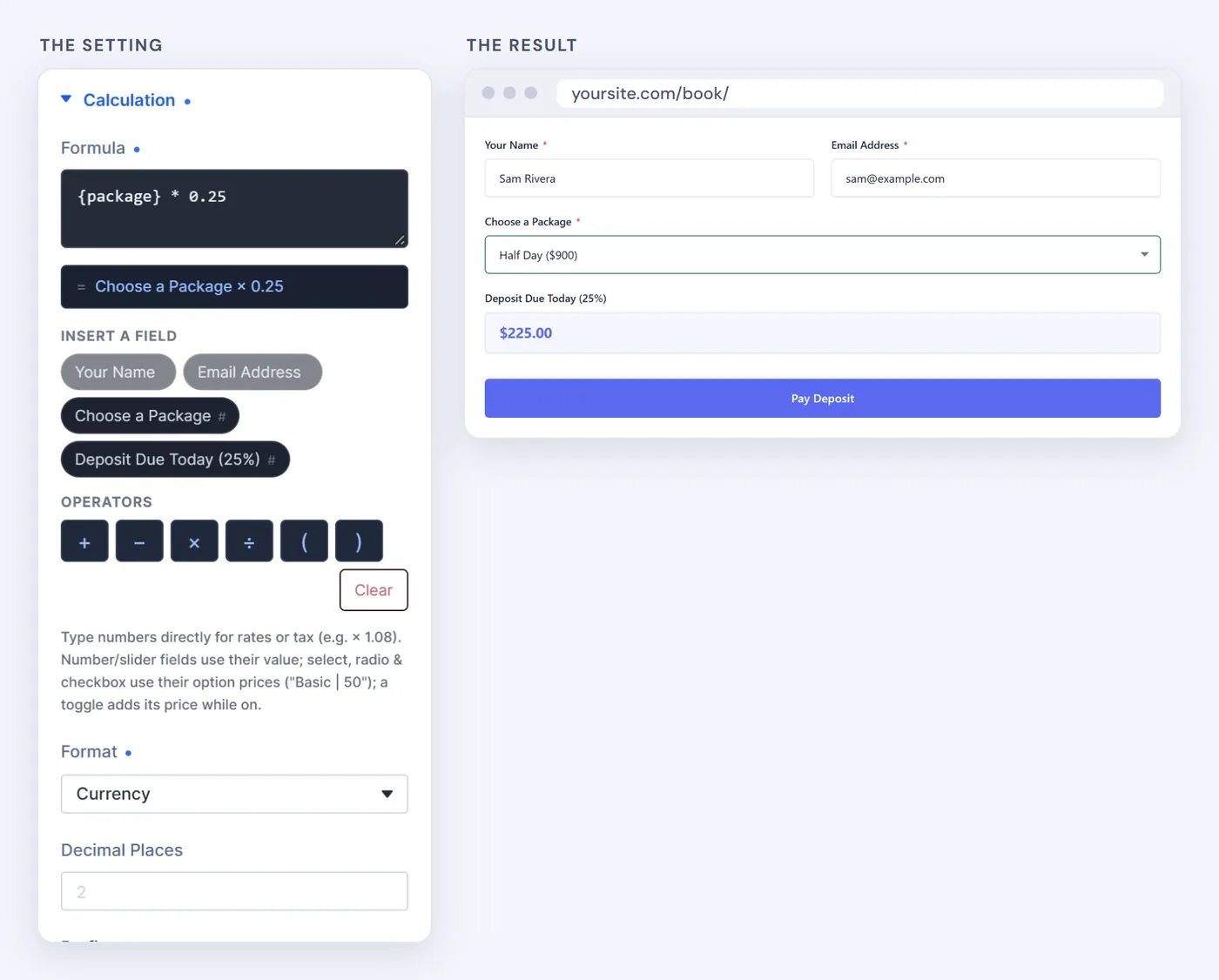
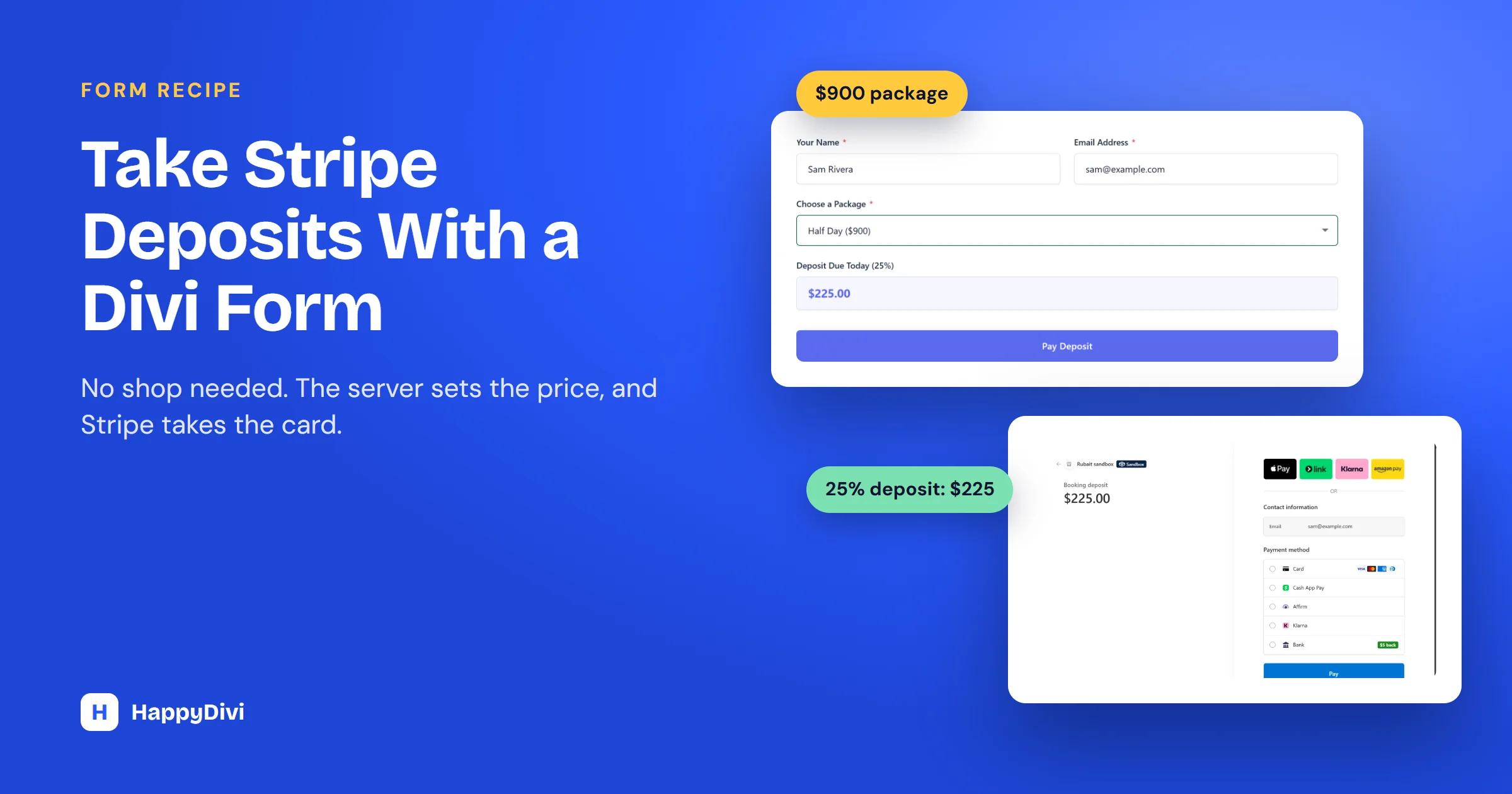
Choose the $900 package and the visitor sees $225.00 update live.
Step 3: Turn On Require Payment
Select the form module and open Form Settings. Near the bottom:
- Turn on Require Payment.
- Set Amount to From a form field. For one set price, choose Fixed price instead.
- Set Amount Field to your Deposit field.
- Write a Payment Description, such as "Booking deposit". Visitors see it at checkout.
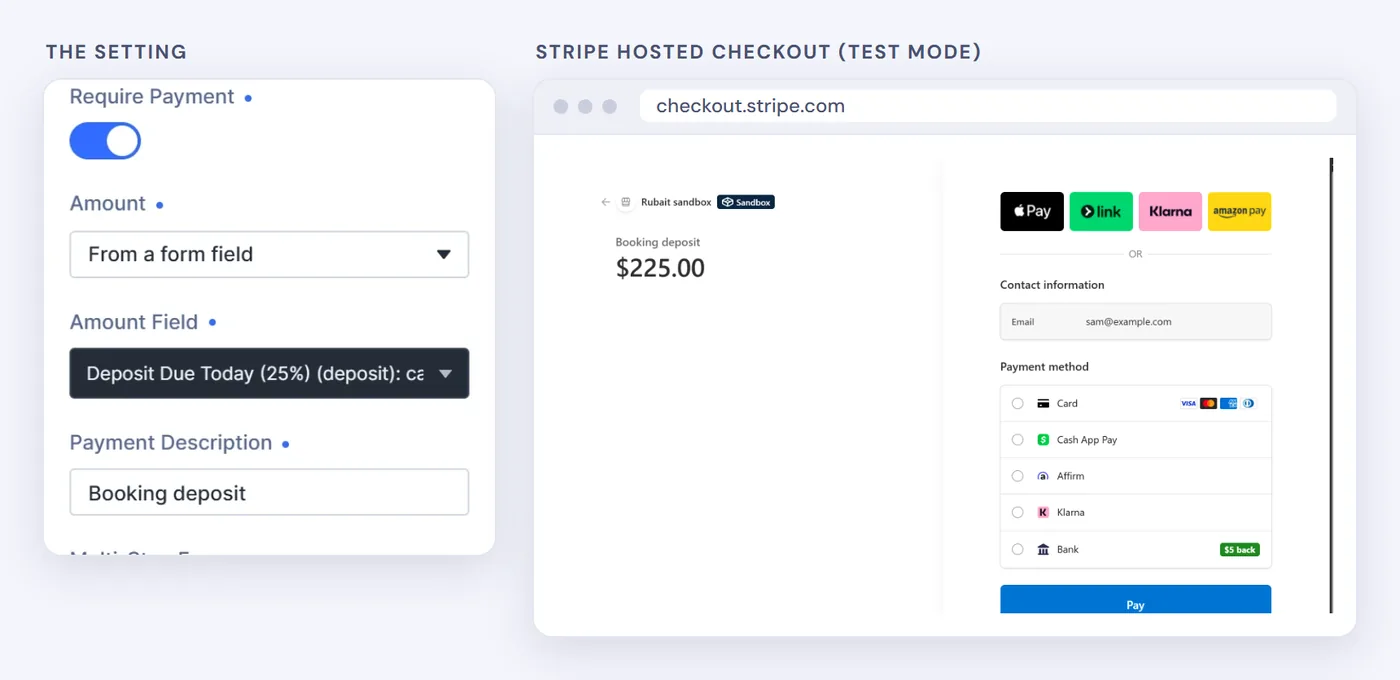
The $900 package reached Stripe's checkout with the correct $225.00 deposit.
Step 4: Test Before Going Live
Submit the form and pay with Stripe's test card: 4242 4242 4242 4242, any future expiry date and any three-digit CVC. No real money moves. Then check that the order shows as Paid and that the emails arrive. Only then switch Mode to Live and add your live keys.

Our test: a $225.00 deposit paid with the 4242 test card, shown as Paid with a Refund button.
What we tested
We ran this payment in Stripe's sandbox on a local site. Stripe cannot send webhooks to a local site, so the return page said it was still confirming the payment until we clicked Check Status on the Orders page. On a public site, the webhook does this for you. Test once on your own site to confirm it.
Seeing a second currency at checkout?
Stripe can offer some visitors a price in their local currency next to yours. In our test, a visitor in Bangladesh could choose BDT or $225.00. You control this in your Stripe settings, under Adaptive Pricing.
What Happens When Someone Pays
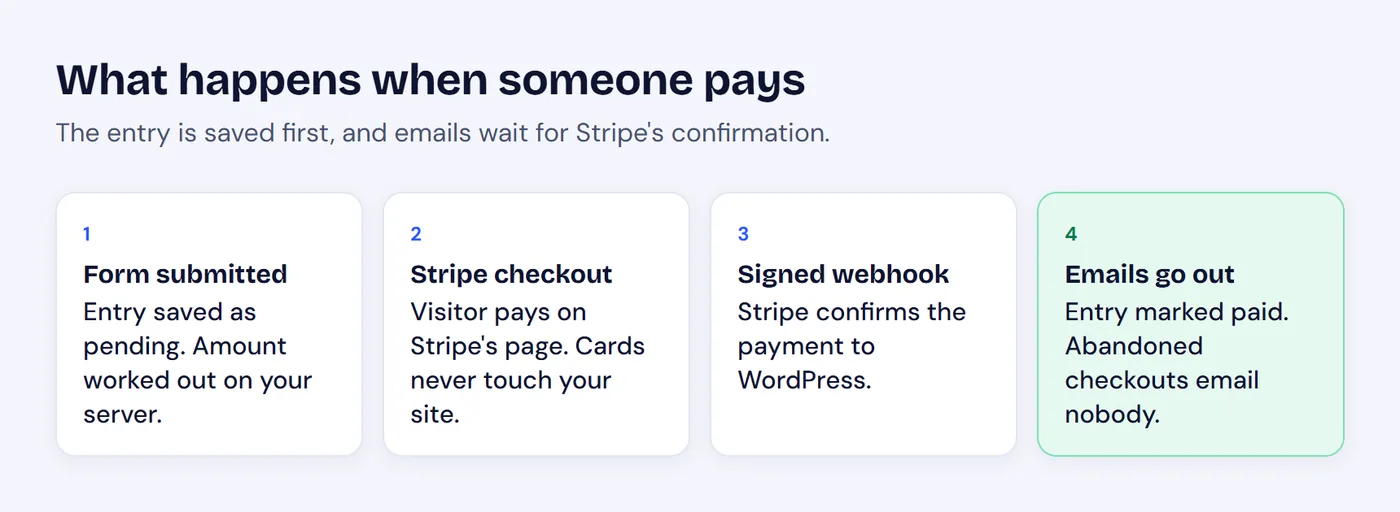
The entry is saved first, and emails wait for confirmation.
- The price is worked out on your server. A visitor who edits the amount in their browser still pays the right price.
- Card details never touch your site. Visitors pay on Stripe's hosted page.
- Emails wait for payment. An abandoned checkout never sends a false "booking confirmed".
- A safety net. If a webhook is missed, an hourly job re-checks payments still pending after about 25 hours. You can also click Check Status on the Orders page at any time.
- Refunds in WordPress. Payments appear on the Orders page, where you can refund with one click.
Variations on the Recipe
| Form | Price setup |
|---|---|
| Consultation booking | Fixed price |
| Service quote with deposit | Calculated total with a percentage |
| Event tickets | Price per ticket times a Number field |
| Donation | Radio amounts, or a Number field |
| Package with add-ons | Priced Select plus priced Checkbox options |
Pair any of these with conditional logic so each package only shows its own add-ons.
When to use WooCommerce instead
If you sell many products, need a cart, shipping or stock control, a shop plugin is the better fit. A payment form suits one-off bookings, deposits and donations.
Frequently asked questions
Can the Divi Contact Form module take payments?
No. Divi's own Contact Form has no payment option. You need a form module with payments built in, or a shop plugin such as WooCommerce.
Is it safe to take card payments from a form?
With hosted checkout, card details are entered on Stripe's own page and never pass through or get stored on your website.
Does HappyDivi Form support PayPal?
Not yet. Stripe is supported today, and PayPal shows as coming soon in the settings.
Are payments in the free version?
No. Stripe payments and the Calculated field are part of HappyDivi Form Pro.
From HappyDivi
HappyDivi Form
Saves every entry inside WordPress, so a lead never depends on an email arriving.
- 22 field types, multi-step forms and conditional logic
- Native Divi 5 module
Free plan available
Comparing options? Read HappyDivi Form vs Divi Contact Form and Contact Form Helper.
From HappyDivi
HappyDivi Form
Saves every entry inside WordPress, so a lead never depends on an email arriving.
- 22 field types, multi-step forms and conditional logic
- Native Divi 5 module
Free plan available