If your Divi contact form says "sent" but no email arrives, the most likely cause is your host blocking or distrusting WordPress's default PHP mail. The fix is usually to send through SMTP or an email service, then add SPF and DKIM records to your domain.
That success message only means WordPress accepted the message. Delivery happens afterwards, and it can still fail without any warning. Meanwhile, your visitor thinks you ignored them.
Use the chart below to find your problem, then jump to the matching fix. Most people are done within 30 minutes.
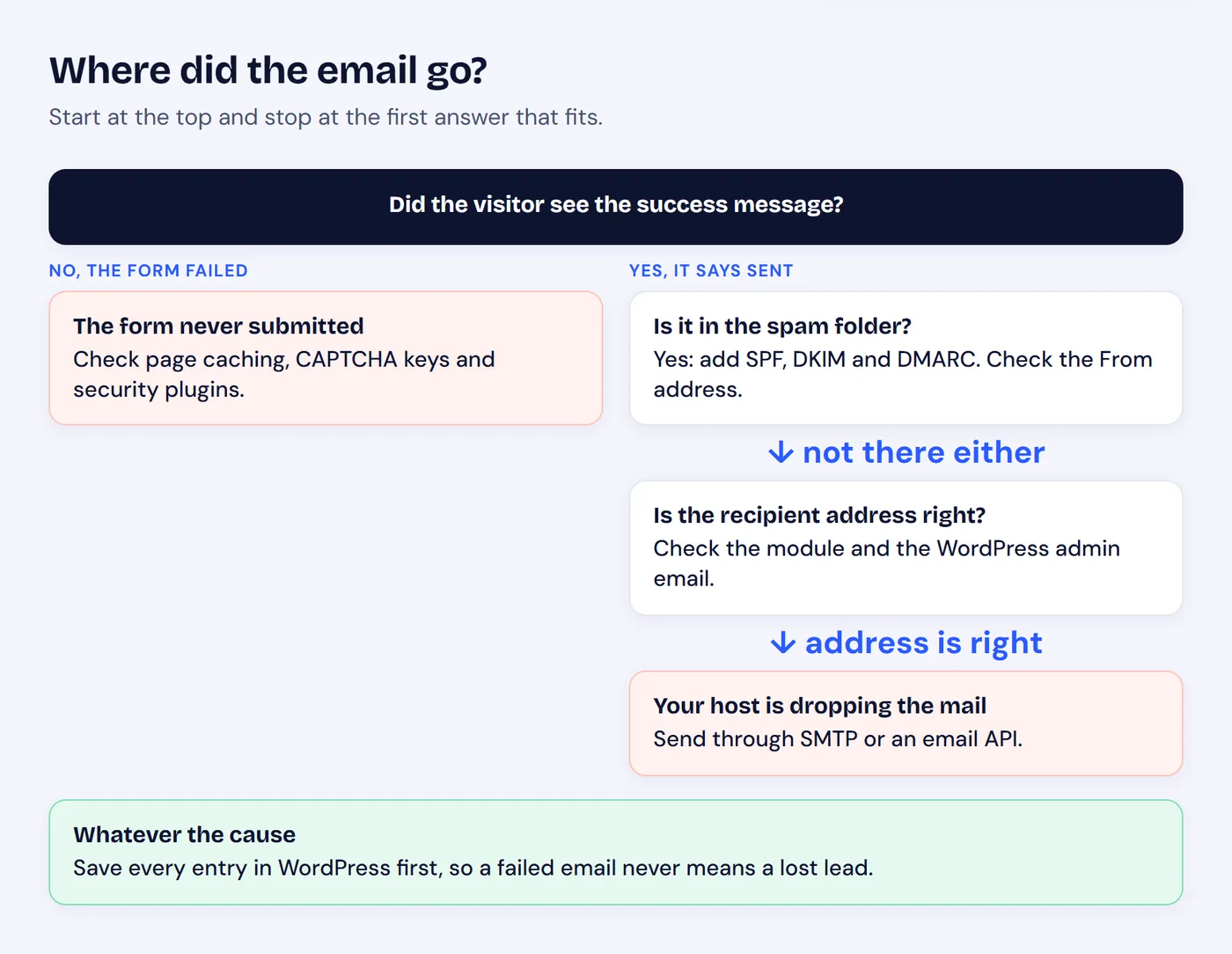
Start at the top and stop at the first answer that fits.
Fix 1: Check the Recipient and Your Spam Folder
Start here, because it takes two minutes:
- The recipient address. Open the Contact Form module and check its Email Address setting. If it is empty, Divi sends to the site admin email from Settings → General, which may be an old address nobody reads.
- Your spam folder. Search spam and junk for your site name.
- A second inbox. Send a test to a Gmail address as well as your own domain. Some company mail servers filter website mail on their own.
Fix 2: Send Through SMTP Instead of PHP Mail
This is the fix most sites need. By default, WordPress uses the server's PHP mail function. Many hosts limit it, and mail providers distrust it because it does not prove the message comes from your domain.
- Install an SMTP plugin such as FluentSMTP or WP Mail SMTP.
- Connect a mail service: your email host, Google Workspace, Brevo, Postmark, SendGrid or Mailgun.
- Set the From address to one on your own domain, such as hello@yoursite.com.
- Send the plugin's test email, then submit your form again.
Common mistake
Do not set the From address to the visitor's email. It looks like your server is impersonating Gmail or Outlook, and providers reject it. Send from your own domain and put the visitor in Reply-To.
Fix 3: Add SPF, DKIM and DMARC Records
If mail arrives but lands in spam, your domain is probably not proving who may send for it. Three DNS records solve that:
- SPF lists the services allowed to send mail for your domain.
- DKIM signs each message so providers can check it was not changed.
- DMARC tells providers what to do when those checks fail.
Your mail service gives you the exact values. Add them in your domain's DNS settings, wait for them to update, and test again. A free tool such as MXToolbox can confirm they are correct.
Fix 4: Rule Out Caching, CAPTCHA and Security Plugins
If the visitor does not see a success message, the email was never the problem: the form did not submit.
- Page caching. A cached page can carry an expired security token. Exclude the contact page from your cache and test again.
- CAPTCHA. Wrong or expired keys can block every submission. Check the keys, or turn CAPTCHA off briefly to test.
- Security plugins. Some block form requests that look like spam. Check their logs.
Stop Depending on Email Alone
Everything above makes email more reliable, but no setup is perfect. Mailboxes fill up, providers have outages, and filters change overnight. Divi's Contact Form only sends an email and keeps no copy, so any of those failures loses the message.
Saving entries first removes that risk. HappyDivi Form, a native Divi 5 form module with a free version, stores each submission in WordPress before sending anything.
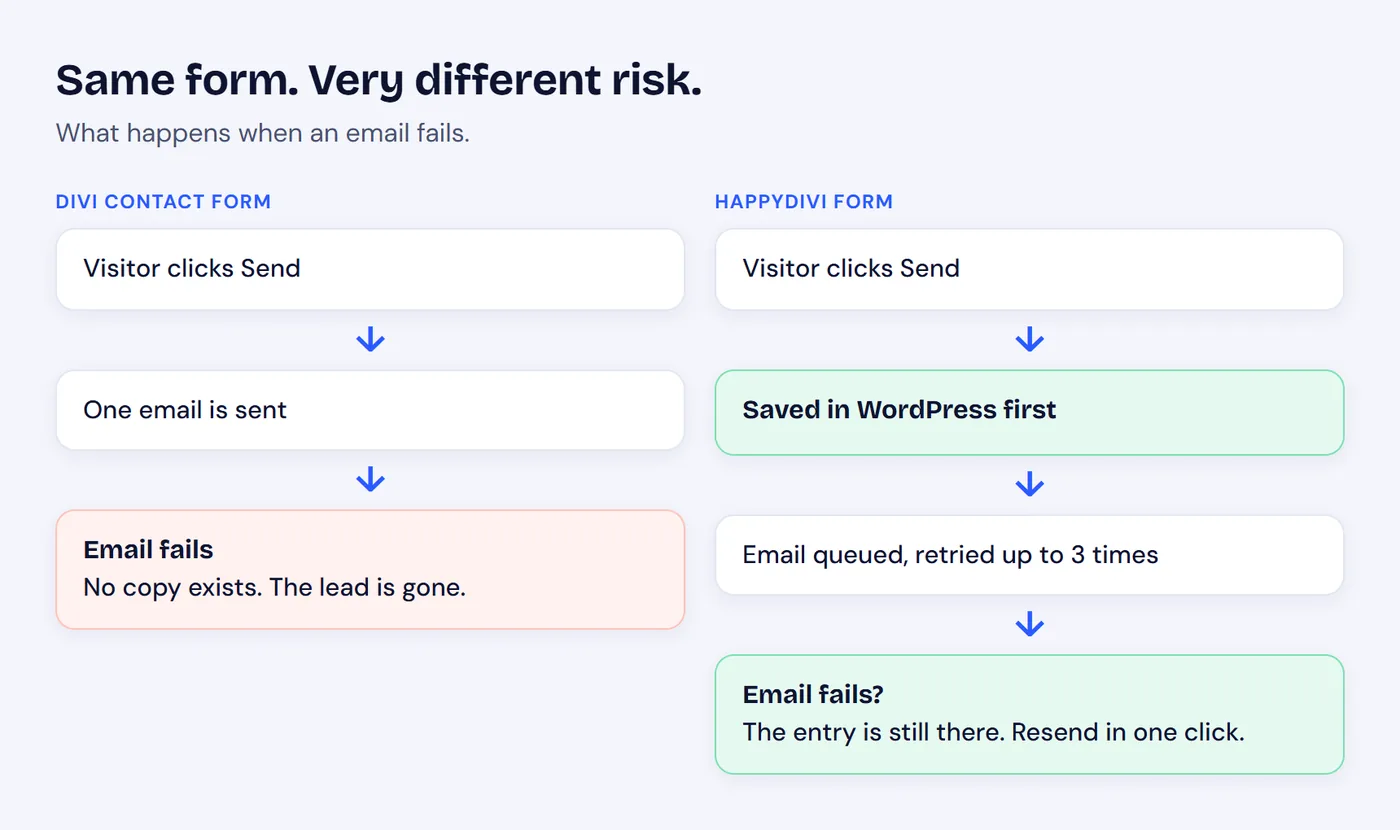
If the email fails, one path loses the lead and the other keeps it.
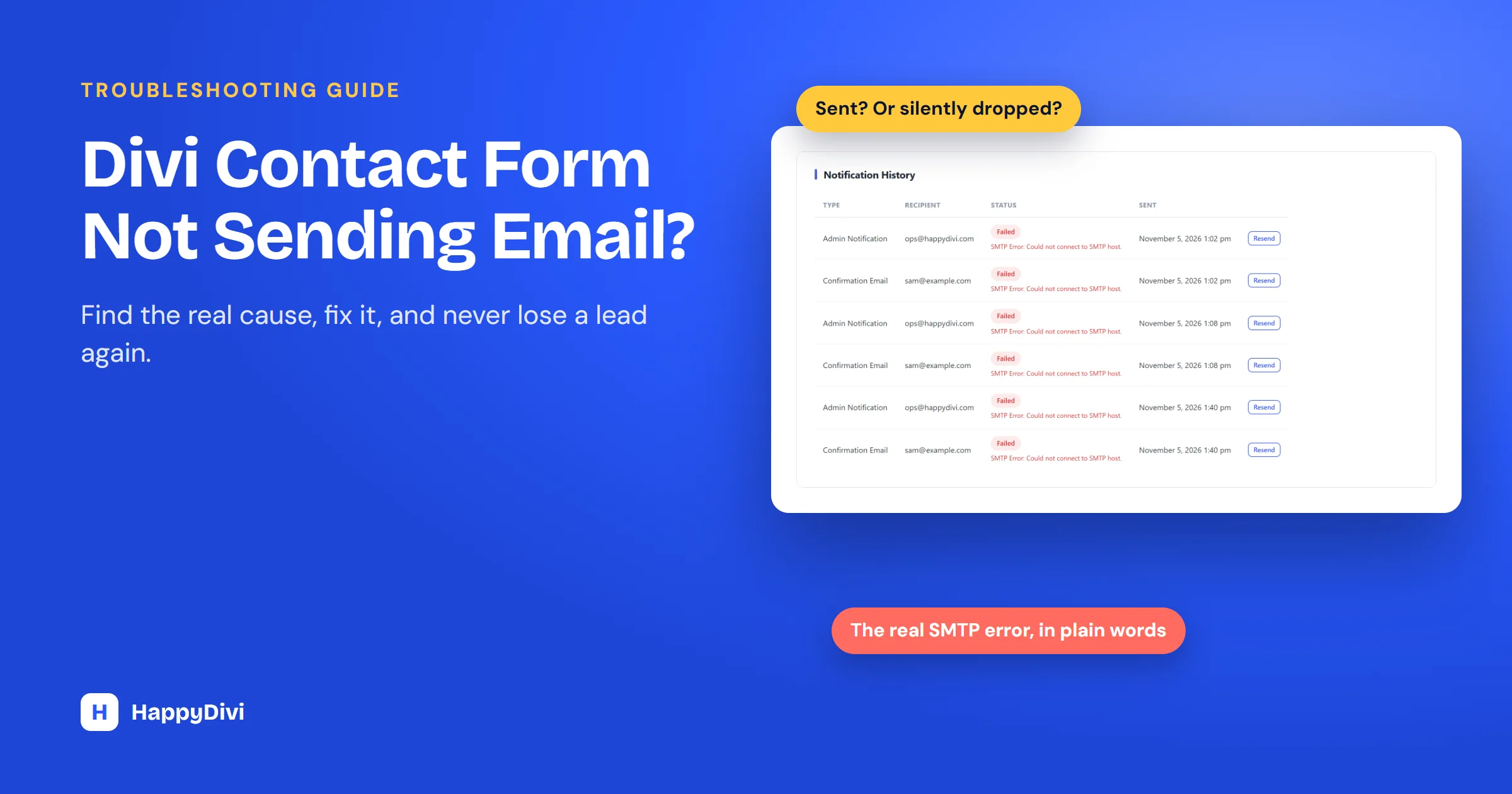
It also shows you what actually went wrong. When we tested a form on a local site with SMTP deliberately unreachable, each entry recorded the failed attempts, the real error and a Resend button:
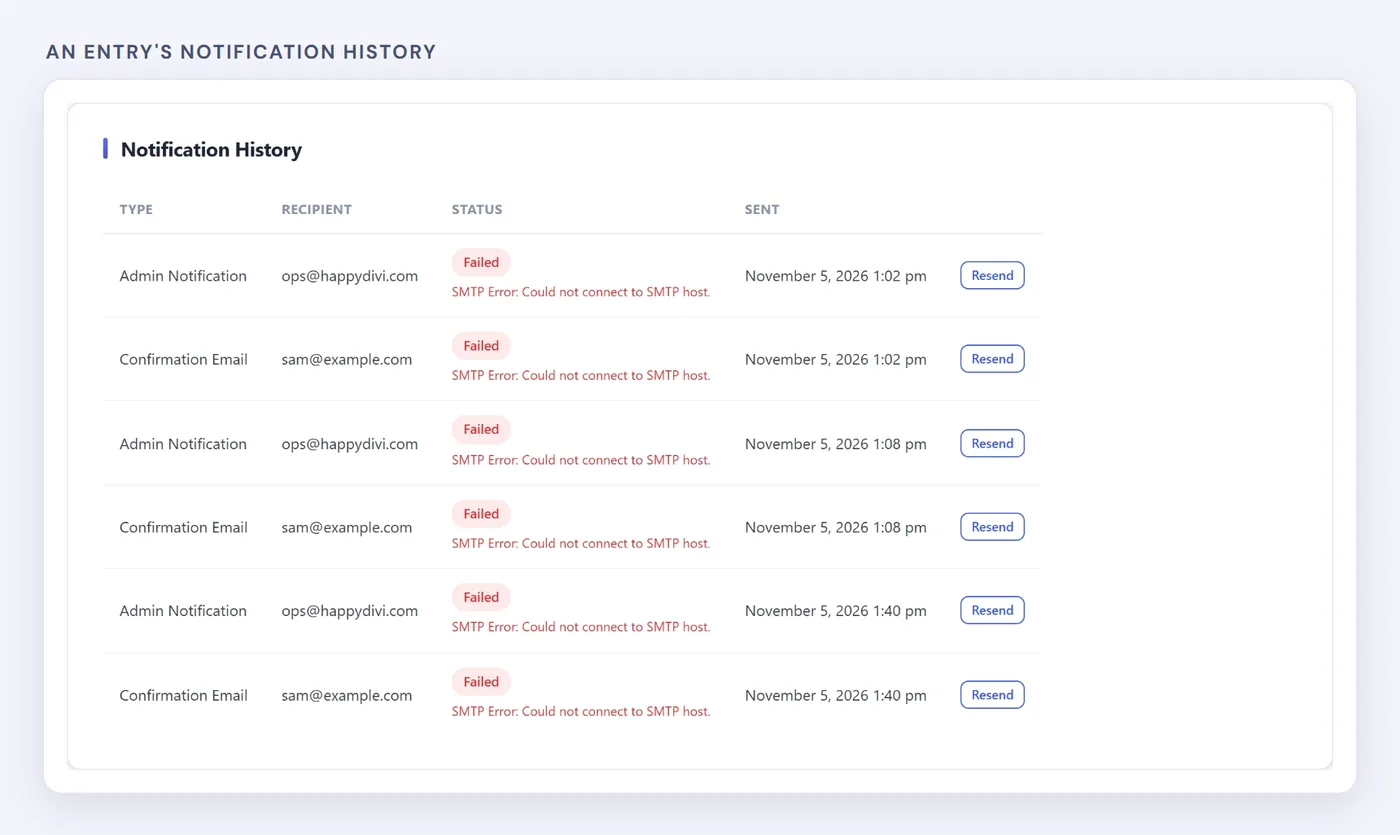
Our test: failed sends listed with the provider's real error message.
The free version also includes:
- A delivery queue that retries a failed send up to 3 times.
- Four ways to send: WordPress default, your own SMTP server, Brevo or Postmark.
- SMTP plugin detection, so it works alongside an SMTP plugin you already use.
- A clear warning on the settings screen that WordPress default mail is unreliable on most hosts.
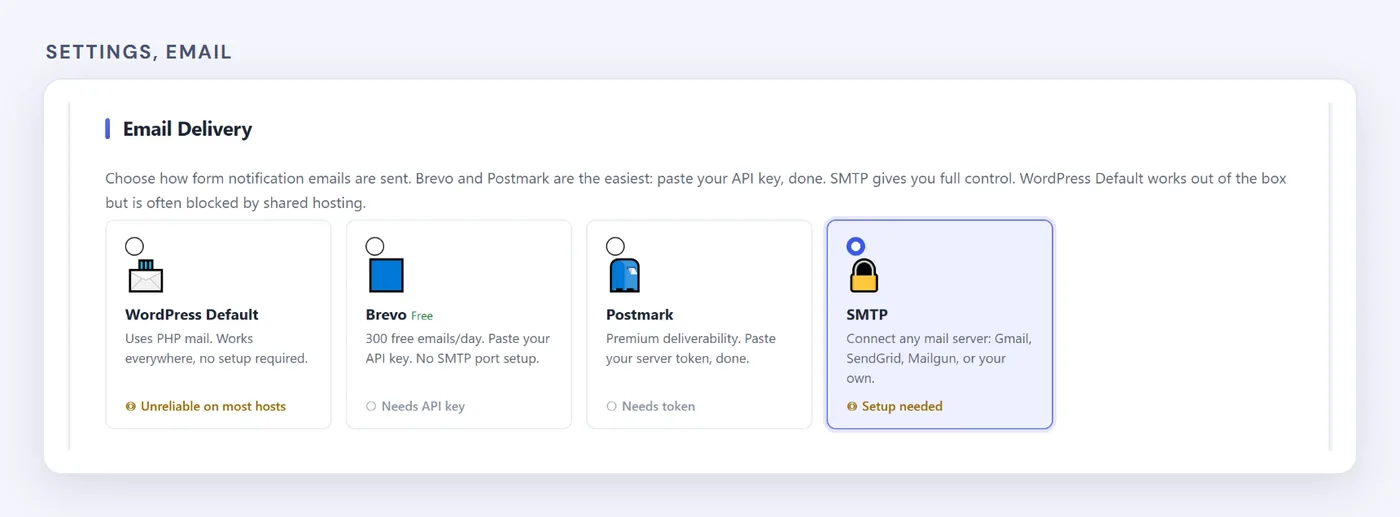
Choosing how email is sent, under Settings, Email.
Quick Reference: Symptom, Cause, Fix
| Symptom | Likely cause | Fix |
|---|---|---|
| No email at all | PHP mail blocked | Send through SMTP |
| Email lands in spam | Missing SPF or DKIM | Add DNS records |
| Some emails go missing | From set to the visitor's address | Use your domain, visitor in Reply-To |
| Form will not submit | Cached page or CAPTCHA keys | Exclude from cache, check keys |
| Wrong inbox | Empty recipient field | Set the address in the module |
| Leads lost for good | Form stores nothing | Use a form that saves entries |
Frequently asked questions
Why does my Divi contact form say sent but no email arrives?
The success message only means WordPress accepted the message. Delivery happens afterwards, and it usually fails because the host blocks PHP mail or the domain is not authenticated.
Does Divi save contact form submissions?
No. Divi's Contact Form module sends an email and keeps no copy. To keep a record, use a form plugin that stores entries in WordPress.
Which SMTP plugin is best for Divi?
FluentSMTP and WP Mail SMTP are both solid choices and work with any Divi site. The mail service you connect matters more than the plugin.
Can I recover messages that were never delivered?
With Divi's own form, no, because nothing was stored. With a form that saves entries first, every message stays in WordPress and you can resend the notification once delivery is fixed.
From HappyDivi
HappyDivi Form
Saves every entry inside WordPress, so a lead never depends on an email arriving.
- 22 field types, multi-step forms and conditional logic
- Native Divi 5 module
Free plan available
Also read: how to save Divi contact form entries.
From HappyDivi
HappyDivi Form
Saves every entry inside WordPress, so a lead never depends on an email arriving.
- 22 field types, multi-step forms and conditional logic
- Native Divi 5 module
Free plan available